 The Nokia Store application is currently inviting users to download a number of premium applications or games for free for next 30 days. This is another such event from Nokia Store added to same happened in the past. For different phone model and Symbian OS versions Nokia (OVI) Store presents a bunch of cool games and useful apps: Angry Birds, Moodagent, Nimbuzz, eBuddy, Worms, Blocks, Diamonds, Montezuma etc.
30 November 2011
Nokia Store presents free premium apps and games
The Nokia Store application is currently inviting users to download a number of premium applications or games for free for next 30 days. This is another such event from Nokia Store added to same happened in the past. For different phone model and Symbian OS versions Nokia (OVI) Store presents a bunch of cool games and useful apps: Angry Birds, Moodagent, Nimbuzz, eBuddy, Worms, Blocks, Diamonds, Montezuma etc.

10 March 2011
Ovi Store client for Symbian updated
 Nokia sent user emails about Ovi Store servers down this Wednesday because of Nokia Ovi Store client received an update. Still no official update list available, but you can fell that the app is more smooth and quicker in navigating and actions.
15 December 2010
Nokia Loop in Ovi Store - mix music on the phone

Nokia is running a promo campaign "It's not technology it' s what you do with it", developed by Wieden + Kennedy, addressed to Nokia N8 and Nokia C7 phones. As part of this campaing Nokia has published in Ovi Store the "Loop" application. This software allows Nokia users to mix different musical tracks. With this app users are able to record, edit and loop up to four tracks. Also users may upload their mixes and share it with friends.
Nokia's global marketing director Kari Tuutti said: "We are super excited to bring the Nokia Loop App into Ovi Store. We cannot wait to see the innovative ways that music lovers will use this fun app and share their loops with friends and social networks."Nokia uploaded to YouTube a clip about extreme poodle styling, "Poodle Loop", which been produced to demonstrate the app capabilities. You may watch it too here.
03 December 2010
Opera Mini 5.1 for Nokia Symbian phones now in sis installer
 Opera Software finally ported it's superb web browser to native Symbian sis format. The main question now is - where to download this app to your Nokia phone? You can do it the same way as with regular J2ME version of Opera Mini app, just follow this link m.opera.com and scroll down web page until you see link to Opera Mini for Symbian sisx installer. This version supports all modern Symbian S60 versions from 3rd edition to 5th and Symbian^3.
The Opera Mini 5.1 native app got some improvements to the J2ME version of Opera Mini:
- Significantly faster (2x-3x) loading time
- Support for more Nokia devices
- Faster page-load and scrolling
- Native device text input and FEP support, including narrative like Talks
- Symbian clipboard integration for copy & paste, email, web browser
In wrap-up I can say that the new, optimized native version has excellent performance and is better integrated with native applications and Symbian OS. I waited this release a long time, now I'm happy to use it in my phone.
Today Opera Software released Beta 2 version of Opera Mini for Symbian. It has improved stability and FEP input support.
02 December 2010
Facebook Chat on Nokia phones - FriendChat app
 Some new Nokia phones like Nokia N8, C7 and other running Symbian^3 OS got embedded Facebook support, but some old ones running Symbian^1 (Symbian S60v5) doesn't have it. For such type of Nokia devices the next app would be extremely helpful.
This is FriendChat app by Bolser Agency. It's an Instant Messaging app which use Facebook Chat to connect you to all of your Facebook friends. The app shows you statuses of your friends and allow you to chat with them. FriendChat is compatible with Symbian OS S^3 and Symbian OS S60v5 Nokia phones.
Main view of the app contains list all of your Facebook friends and their current online status. Friends list sorted by online status of your contacts. Click on a contact leads you to the chat screen - the layout of this screen is traditional for such type of apps. FriendChat is free to download in Ovi Store.
01 December 2010
Change default web browser on Nokia N8, C7, C6-01 and other Symbian phones - How to
 Latest Nokia smartphones running Symbian^3 (Nokia X7, N8, E7, C7, C6-01 and more in future) got nice WebKit-based web browser. But, until the big update, announced by Nokia CEO, the best user experience you may get with the new version 10.1 of Opera Mobile browser. However, if you click web link in some application on your phone (e.g. in an preinstalled email client) it's opening in the default Nokia "Web" browser.
But in new Symbian^3 OS there is a setting that allows you to change app associated with links. This setting page can be found not only on Nokia phones running Symbian^3 but on some Symbian^1 Nokia devices like 5800, 5530 and N97. This is "Default applications" tab in main Settings menu in your phone. To navigate to this pane follow this way Settings -> Application Settings -> Default applications. First Symbian^3 and Symbian^1 devices (e.g. X6, N97 mini) got this pane in new firmware updates. In Symbian^1 phones navigate to this pane this way: Settings->Phone->Application settings->Default application. Here you'll see four Default applications settings: browsing internet, playing music, playing video clips and viewing images. In first setting you can change default browser.
Please note that the first version of Opera Mobile app, which supports this feature, is 10.1. Unfortunately, WRT apps continue to launch Web, even if you click on an web link and open browser. For example, in Nokia's Social Networking app, which is WRT-based, click on a web link in a Facebook message or Twitter tweet will always open it in Nokia Web. Hope this will be fixed in new firmware releases.
25 March 2010
Nokia Ovi Guide magazine - Top apps and games reviewed
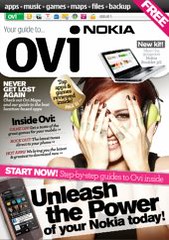 Nokia releases first issue of its new Nokia Ovi Guide magazine. In this release you will read about:
- Ovi features like Mail, Share, Contacts, Music, Files
- App reviews
- Game reviews
- Nokia recommendations
- Social networking and location-based apps which you can find in Ovi Store
Social networking - Gravity a mobile twitter client, Fring - a VoIP app, BuddyCloud, ShoZu - mobile content uploader and Nimbuzz - multi IM networks client.
Location-based apps - PinPoints, Endomondo Tracker, Dad's Cab, Near Here, I Parked Here.
Also were covered MobNotes, Vringo, Qik, Shazam, Twittle and much more. So, don't wait, rush to read this guide in Ovi world.
19 October 2009
Where to find Ovi store app and games reviews
 Today Ovi Store is the great place to find free apps, games and multimedia content for your Nokia devices. But description of apps in store is really short, and you can't get enough screenshots. Don't worry, Nokia now has a blog with reviews of the best content in Ovi store. MyDailyApp blog publish every day a new review of app or game or other store content. They mostly pick free and the best content in the store. Go there and start browsing for new free apps and games for your Nokia device.
26 May 2009
How to use Ovi store on Nokia phone
Today Ovi Store has officially opened for users worldwide. Millions of people with Nokia devices now can benefit from tons of free and premium content. This service available for more than 50 Nokia S60 and Series 40 devices right now. But how to open and use Ovi Store on your phone? This is really easy - just select the Ovi Store icon in the Download folder on your device and open the Ovi Store page. Or you can get to the Ovi Store by visiting store.ovi.com with your phone web browser. There you can login to your account and start downloading apps to your phone. I will post my first impressions of this service soon.17 April 2009
Upgrade your Nokia 5800 with free apps
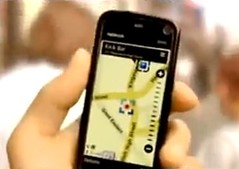 6 April Nokia has released a new TV commercial with its first touch-screen device Nokia 5800 XpressMusic. This video shows what a cool things you can do with your 5800 device like Internet messaging and browsing with web video support, GPS navigation, picture and video uploading to Flickr and YouTube.
I wonder how we can extend these rich capabilities of this perfect device with freeware applications? The first thing I thought was extended messaging to many IM networks with Nimbuzz, Octrotalk, Palringo, Yeigo, Bombus and other such applications. The second thing would be free and low-cost VoIP telephony with great VoIP clients like Fring or Truphone. Other interesting option would be making from your phone a wireless webcam or microphone for your laptop which is possible with help of WWIGO or Mobiola Webcam and Mobiola Headset application.
My question to readers: how else we can upgrade our 5800 touch devices with Symbian freeware?
17 February 2009
Free Skype VoIP client in Nokia phones
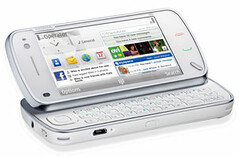 Finally Skype will embed its VoIP application to the Nokia mobile phones running Symbian S60. The first one will be the new N97 device. Moreover Skype software will be available to download onto other Nokia Symbian S60 models. But standalone version is less integrated into address books, messaging and other phone's built-in features. Integrated version of Skype client in Nokia N97 will be able to show when Skype contacts are online, send messages to them, launch free Skype-to-Skype voice calls, and use native phone client to make Skype Out calls.
 Looks like we move to Skype availability on all Nokia Symbian smartphones.
16 February 2009
Symbian freeware in Ovi Store
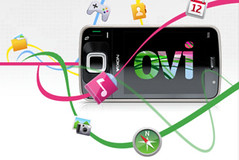 Today at MWC 2009 Nokia has announced its new great service for smartphone consumers. This is a new Ovi Store - an application and content download service that will be launched in early May of this year. I've reviewed existing Nokia MOSH freeware download service which will be part of new Nokia Ovi Store. This means that Ovi Store will have a lot of free applications, games, themes, ringtones and other rich and free audio-video content. Supported Nokia devices contains a wide range of new and existing Symbian S60 smartphones and Series 40 devices. Since this service will be launched in May we doesn't have link to it yet, but we still can go to Nokia MOSH and enjoy free stuff.
05 February 2009
Nokia 5800 error "Expired certificate" solution
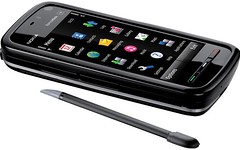 Nokia consumers report the Nokia 5800 Express Music phones with touch screen got a software bug in installation software. This bug prevents you from installing any Symbian signed or developer singed sis packages with applications. You always got "Expired certificate" error message. For self-signed applications installation process finished successfully. This happens probably because of new Symbian S60 5th Edition software running on Nokia 5800. On some user forums people find a solution to solve this issue.
The main action you have to do is to reset your phone's software to manufacturer state via key sequence *#7370#. Device ask you to enter lock code, it should be 12345. But you can backup all your data before this action with Nokia PC Suite and restore it after resetting software.
Also it's better to update phone's firmware to latest version (to check version number press *#0000#) because in older versions you may still got "Expired certificate" error message sometimes later.
That's it! Now you can install any application you want, even developed for older S60 3rd Edition devices like Fring, Google Maps, Mobiola, etc.
Subscribe to:
Posts (Atom)