There is priorities in Audio MMF Server for each client. When you use API classes for recording and playing audio you always have to setup some priority to your audio. There are different priorities for some purposes. What value should you select? In many cases it will be enough to setup EMdaPriorityNormal. If you setup EMdaPriorityMax value then you cannot be interrupted by other MMF Server clients.
But in some cases standard Symbian applications and services can interrupt your audio input/output, for example, beeping of key pressing. You will get KErrDied error code then. What we should do to avoid this? The solution, recommended by Nokia developers is to setup priority of your client to 80, like this:
iAudioPlayer->SetPriority( 80, EMdaPriorityPreferenceTimeAndQuality );
So you won't be interrupted by other clients and will not block audio at all for clients with higher priority.
16 November 2005

14 November 2005
Mobile Symbian podcast catcher for S60 phones
Podcasting nowadays is widely popular in the world. And it is strange that no one have released a software for Symbian smartphones that can subscribe and recieve podcast.

But recently such software was created by Mobiedge. It is Mobiedge Radio - a Wireless/Wired Podcasting Client. As developers claim: "Mobiedge Radio is a podcatcher (podcasting client) that runs on an S60 mobile phone. You can use it to download, read, manage your subscribed podcasting feeds on your phone."
You can buy this software application at Handago here.
If you have purchased Mobiedge Newspaper software you don't need to buy this one, just upgrade to version 1.1 of Mobiedge Newspaper.
But recently such software was created by Mobiedge. It is Mobiedge Radio - a Wireless/Wired Podcasting Client. As developers claim: "Mobiedge Radio is a podcatcher (podcasting client) that runs on an S60 mobile phone. You can use it to download, read, manage your subscribed podcasting feeds on your phone."
You can buy this software application at Handago here.
If you have purchased Mobiedge Newspaper software you don't need to buy this one, just upgrade to version 1.1 of Mobiedge Newspaper.
07 November 2005
The new Sony Ericsson P990 smartphone was announced
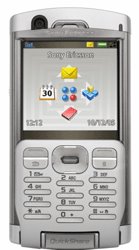
The Sony Ericsson P990 will be the first commercially available smartphone to adopt Symbian OS v9.1 and the UIQ 3 software platform.
Screen Display:
240x320 pixels QVGA
262 k color
262 k color
Memory:
RAM Memory: 64MB
Flash Memory: 128MB
Shared memory for storage: Up to 80MB user free memory
External memory: Up to 4GB Memory Stick Duo Pro
Max JAR Size: Unlimited (but depending on available storage)
Max SIS Size: Unlimited (but depending on available storage)
Flash Memory: 128MB
Shared memory for storage: Up to 80MB user free memory
External memory: Up to 4GB Memory Stick Duo Pro
Max JAR Size: Unlimited (but depending on available storage)
Max SIS Size: Unlimited (but depending on available storage)
Local Connectivity:
Infrared
Bluetooth
USB
WiFi
Extra features:
2 Megapixel camera with autofocus
Video recorder/player
QWERTY, QWERTZ, AZERTY and Russian keyboard options
Jog Dial
QuickShare
MusicDJ
PlayNow
4GB Memory Stick Duo Pro
Flight mode
FM radio
Video recorder/player
QWERTY, QWERTZ, AZERTY and Russian keyboard options
Jog Dial
QuickShare
MusicDJ
PlayNow
4GB Memory Stick Duo Pro
Flight mode
FM radio
Press release says:
Developers can program in C++ or Java to create powerful professional and personal productivity tools for the P990. The smartphone is based on Sony Ericsson's Java Platform 3 (JP-3) and supports four new JSRs including Web Services (JSR 172). It is the twentieth phone from Sony Ericsson to support Mobile Java 3D with JSR 184. The P990 supports both CDLC and CDC Java environments, and standard Java applications can run in both flip-open and flip-closed modes.
03 November 2005
New Nokia Symbian-smartphones N71, N80 and N92
Nokia has introduced three new Symbian OS-based phones.
With the browsing experience accentuated by its huge high resolution color display (320 x 240 pixels, up to 262,144 colors), the Nokia N71 supports the new Nokia Web Browser with Mini Map. A pocketable entertainment system, the Nokia N71 keeps people entertained with digital music, videos and stereo FM radio and is the latest member of the Nokia XpressMusic family.
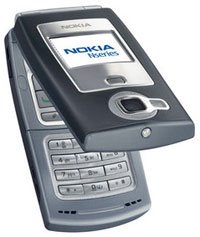
Nokia N80 is the first ever handset to enable seamless home media networking between compatible TVs, audio systems and PCs.
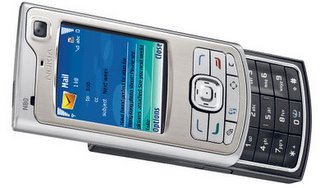
Nokia N92 is, the first integrated DVB-H mobile device in the Nokia Nseries range for watching broadcast TV programs.
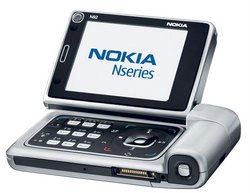
For more info go to Nokia site.
With the browsing experience accentuated by its huge high resolution color display (320 x 240 pixels, up to 262,144 colors), the Nokia N71 supports the new Nokia Web Browser with Mini Map. A pocketable entertainment system, the Nokia N71 keeps people entertained with digital music, videos and stereo FM radio and is the latest member of the Nokia XpressMusic family.

Nokia N80 is the first ever handset to enable seamless home media networking between compatible TVs, audio systems and PCs.

Nokia N92 is, the first integrated DVB-H mobile device in the Nokia Nseries range for watching broadcast TV programs.

For more info go to Nokia site.
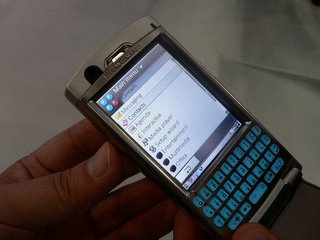
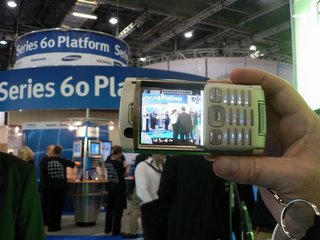
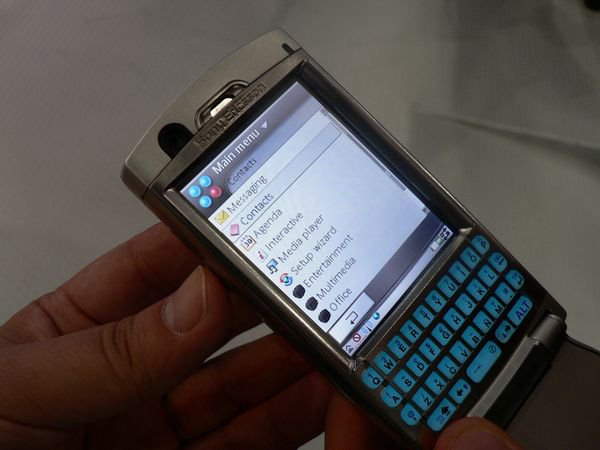
Want to look at new Symbian UIQ smartphone SonyEricsson 990 with opened flip?
If you didn't see how SonyEriccson P990 looks with opened flip or recording video then this two pictures are for you

31 October 2005
Do action for all files in some directory on all drives in Symbian
In SDL there is a useful sample of how to run through all files in directory:
void ForAllMatchingFiles(RFs& aSession, const TDesC& aWildName, const TDesC& aScanDir)
    {
    TFindFile file_finder(aSession);
    CDir* file_list;
    TInt err = file_finder.FindWildByDir(aWildName,aScanDir, file_list);
    while (err==KErrNone)
        {
        TInt i;
        for (i=0; i < Count(); i++)
            {
            TParse fullentry;
            fullentry.Set((*file_list)[i].iName, &file_finder.File(),NULL);
            // Do something with the full Symbian OS filename
            DoOneFile(aSession, fullentry.FullName());
            }
        delete file_list;
        err=file_finder.FindWild(file_list);
        }
    }
26 October 2005
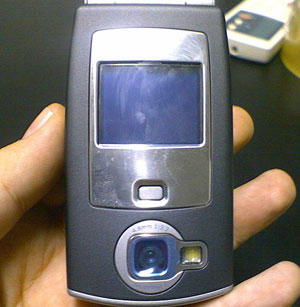
Pics of Symbian smartphone Nokia N71 prototype
In the Internet show up pictures of prototype of the new Nokia Symbian-smartphone N71. Here is the link. And here is one of the pictures:

More about writable descriptor
Code in previous post about writable descriptor was related to use members of class. If you need the descriptor only in small pieceof code then you can write like this:
TPtr8 iWriteDes(iHeapDes->Des());
TPtr8 iWriteDes(iHeapDes->Des());
22 October 2005
How to convert TInt64 to string on Symbian?
Sometimes you need to display some TInt64 on screen so you need to convert it to string representation. But unfortunately you can’t display it using Format() function of Symbian descriptors. What to do? You have to use functions AppendNum() or Num() which can take as parameter TInt64. Code will look like this:
TInt64 n = 123456789;
TBuf<64> tInt64;
tInt64.AppendNum( n );
tSomeString.Format( “I have this value - %S”, &tInt64 );
TInt64 n = 123456789;
TBuf<64> tInt64;
tInt64.AppendNum( n );
tSomeString.Format( “I have this value - %S”, &tInt64 );
20 October 2005
How to assign writable descriptor in Symbian
When you need a writable descriptor like TDes8 to pass as reference into a function ( like FillMyDes(TDes8& aDes) ), and later this function will fill it with data, you probably want to allocate this descriptor in Symbian heap. So you are writing this code:
HBufC8* iHeapDes = HBufC8::NewL(KSIZE);
And then you want to store writable descriptor for later use like this:
TPtr8 iWriteDes(NULL,0);
iWriteDes = iHeapDes->Des();
But iWriteDes don’t becomes what you really wanted. Because you make mistake in previous line of code, you haven’t assigned descriptor, you just trieв to copy the data contained in heap descriptor to you writable descriptor. The right code will look like this:
iWriteDes.Set( iHeapDes->Des() );
Now you got correct writable descriptor in iWriteDes.
HBufC8* iHeapDes = HBufC8::NewL(KSIZE);
And then you want to store writable descriptor for later use like this:
TPtr8 iWriteDes(NULL,0);
iWriteDes = iHeapDes->Des();
But iWriteDes don’t becomes what you really wanted. Because you make mistake in previous line of code, you haven’t assigned descriptor, you just trieв to copy the data contained in heap descriptor to you writable descriptor. The right code will look like this:
iWriteDes.Set( iHeapDes->Des() );
Now you got correct writable descriptor in iWriteDes.
19 October 2005
How to kill another process by its name
This code snippet will kill process with name KPROCNAME
TFullName theName;
TFindProcess process;
while ( process.Next( theName ) != KErrNotFound )
{
if ( ( theName.Find( KPROCNAME ) != KErrNotFound ) )
{
RProcess aProcess;
aProcess.Open( process );
aProcess.Kill(0);
aProcess.Close();
}
}
TFullName theName;
TFindProcess process;
while ( process.Next( theName ) != KErrNotFound )
{
if ( ( theName.Find( KPROCNAME ) != KErrNotFound ) )
{
RProcess aProcess;
aProcess.Open( process );
aProcess.Kill(0);
aProcess.Close();
}
}
18 October 2005
Do you know how to convert to AMR using CMMFCodec?
This task can be tricky because of lack of the documentation on AMR-NB codec in Symbian. The following code will work on Series 60 2.0 devices:
First of all we declare missing declaration from old AmrCodec.h from Series 60 1.0 SDK:
First of all we declare missing declaration from old AmrCodec.h from Series 60 1.0 SDK:
class TAmrEncParams
{
public:
inline TAmrEncParams();
public:
TInt iMode; // encoding mode 0-7 (0=MR475,1=MR515,...,7=MR122,
default 7)
TInt iDTX; // DTX flag (TRUE or default FALSE)
};
TAmrEncParams::TAmrEncParams() :
iMode(7), iDTX(0) {}
And we will also declare UIDs of AMR codecs:
#define KAdvancedUidCodecPCM16ToAMR 0x101FAF68
#define KAdvancedUidCodecAMRToPCM16 0x101FAF67
This is the function that convers PCM data to AMR-NB (note that CMMFPtrBuffer class you can use only on Series 60 2.0 FP2 SDK, on earlier SDKs you have to use CMMFDescriptorBuffer). Size of aDes parameter is supposed to be equal to 320 bytes.
HBufC8* ConvertFromPCMToAMRNBL( const TPtr8& aDes, TInt aMode )
{
TAmrEncParams taepParams;
taepParams.iMode = aMode;
cmmfcCodec = CMMFCodec::NewL(TUid::Uid(KAdvancedUidCodecPCM16ToAMR ));
CleanupStack::PushL( cmmfcCodec );
cmmfcCodec->ConfigureL( TUid::Uid(KAdvancedUidCodecPCM16ToAMR), ( const TDesC8& ) taepParams );
ptrbPCM16 = CMMFPtrBuffer::NewL();
CleanupStack::PushL( ptrbPCM16 );
ptrbPCM16->SetPtr( aDes );
desbAMRNB = CMMFDescriptorBuffer::NewL( 32 );
CleanupStack::PushL( desbAMRNB );
TCodecProcessResult result = cmmfcCodec->ProcessL( * ptrbPCM16, * desbAMRNB );
if ( ( result.iStatus != TCodecProcessResult::EProcessComplete )
( result.iSrcBytesProcessed != ( TUint ) aDes.Length() ) )
return NULL;
CleanupStack::Pop( 2 ); // cmmfcCodec, ptrbPCM16
HBufC8* pAMRData = desbAMRNB->Data().AllocL();
CleanupStack::Pop( 1 ); // desbAMRNB
return pAMRData;
}
16 September 2005
ScreenFTP
Did you hear something about this very interesting software ScreenFTP? This is a new concept of transferring information between PC and your phone. This software uses PC’s display and phones camera to transfer data between PC and phone. Speed of this data channel reaches 1.3 Kbps. They have developed this application for Nokia 6600 phone. You can download it from the site and try to use on your phone.
Subscribe to:
Posts (Atom)