 Today Ovi Store is the great place to find free apps, games and multimedia content for your Nokia devices. But description of apps in store is really short, and you can't get enough screenshots. Don't worry, Nokia now has a blog with reviews of the best content in Ovi store. MyDailyApp blog publish every day a new review of app or game or other store content. They mostly pick free and the best content in the store. Go there and start browsing for new free apps and games for your Nokia device.
Showing posts with label device. Show all posts
Showing posts with label device. Show all posts
19 October 2009
Where to find Ovi store app and games reviews
Today Ovi Store is the great place to find free apps, games and multimedia content for your Nokia devices. But description of apps in store is really short, and you can't get enough screenshots. Don't worry, Nokia now has a blog with reviews of the best content in Ovi store. MyDailyApp blog publish every day a new review of app or game or other store content. They mostly pick free and the best content in the store. Go there and start browsing for new free apps and games for your Nokia device.

26 May 2009
How to use Ovi store on Nokia phone
Today Ovi Store has officially opened for users worldwide. Millions of people with Nokia devices now can benefit from tons of free and premium content. This service available for more than 50 Nokia S60 and Series 40 devices right now. But how to open and use Ovi Store on your phone? This is really easy - just select the Ovi Store icon in the Download folder on your device and open the Ovi Store page. Or you can get to the Ovi Store by visiting store.ovi.com with your phone web browser. There you can login to your account and start downloading apps to your phone. I will post my first impressions of this service soon.29 November 2007
S60 and UIQ PC remote file manager and backup
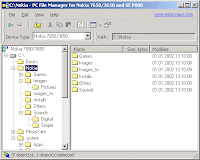 Sometimes we need to transfer a huge amount of files to or from the phone (often to the MMC card). Also we need to transfer a whole directory structure or do backup operations for phone's memory card in case if we what to change it to a new one without losing all the data and without using PC card-reader. Here the solutions I've found at some "PC phone tools" forum thread. The first one is PC File Manager. This application from Epocware gives you an opportunity to manage files on your phone from your PC. It works only for old versions of Nokia and SE devices like Nokia 7650, 3650, 6600 ans SE UIQ P800, P900. Moreover this is shareware application.
The second application was Symbian FileExplorer. This is just devices sis app. Symbian FileExplorer gives you full access to your Symbian phone file system from your PC over Bluetooth (OBEX). Using this application you can access via BT to the all content of your phone memory and do all file operations in bulk mode. This is also a shareware application.
There is also Oxygen Phone Manager but it can't transfer plain files. The only freeware solution for this task for Nokia S60 is the original Nokia PC Suite application, but backup and file transfer in this application doesn't copy all files. For UIQ there is free Symbianware DesktopFileMan.
21 May 2007
Sony Ericsson P1 - the competitor of Apple iPhone on european market
 This powered by UIQ 3 smartphone for networks UMTS 2100-GSM/GPRS 900/1800/1900 will have these main features:
- This phone has full alpha-numeric QWERTY keyboard
- 3.2 megapixel camera with very useful feature - business card scanner(!)
- Large 2.6" touchscreen Transflective TFT display with 262,144 color and 240 x 320 pixels resolution
- Push email including support for Exchange ActiveSync™ and BlackBerry® Connect™
- Integrated WLAN and VoIP enabled
- Opera™ Web Browser 8.0
- Video recording/streaming/viewing supporting H.264 playback
- Bluetooth 2.0 with stereo A2DP
- Support of MP3/AAC/AAC+/e-AAC+ audio formats
- Support of Memory Stick Micro™ (M2™) cards
- Connectivity is Bluetooth 2.0, Infrared, USB with mass storage
Subscribe to:
Posts (Atom)